How to Change the Gamemode on Your Minecraft Server
Set the default gamemode, force it on everyone, or change one player's mode.
Set the default gamemode, force it on everyone, or change one player's mode.
Gamemode controls how players interact with the world: Survival for the normal game, Creative for building with unlimited blocks and flight, Adventure for maps where you can't break blocks, Spectator for flying through walls. You can set a server-wide default and override it per player.
Set the Default Gamemode
The default applies to anyone joining for the first time (and to everyone, if you force it).
Edit it in File Manager > server.properties:
gamemode=survival
force-gamemode=false
gamemodetakessurvival,creative,adventure, orspectator.force-gamemode=trueputs every player back into the default mode every time they join, useful for a strict creative server, annoying if you set individual players to other modes.
The quickest way is the panel's Server Configuration section on the Dashboard
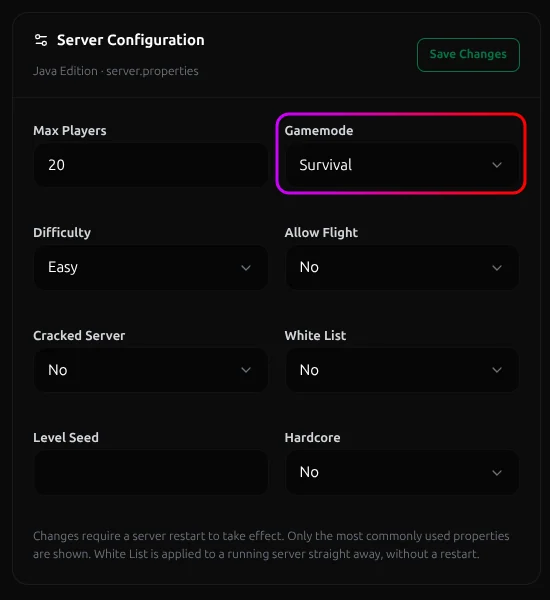 Click Save Changes, and restart. No file editing needed.
Change Gamemode Live With Commands
You don't have to restart to switch modes in-game. As OP or from the console:
| Command | What it does |
|---|---|
/gamemode creative |
Switches you to Creative |
/gamemode survival Steve |
Sets player Steve to Survival |
/gamemode adventure @a |
Sets everyone online to Adventure |
/defaultgamemode creative |
Changes the default for new joins |
Short forms also on some versions work too: /gamemode 0 (survival), 1 (creative), 2 (adventure), 3 (spectator).
Per-Player and Per-Rank Control
Want moderators in Creative but players stuck in Survival? Two ways:
- One-off: just run
/gamemode creative <player>when needed. It sticks until they change it or reconnect (ifforce-gamemodeis on). - By rank: with a permissions plugin like LuckPerms, grant the gamemode command only to staff so regular players can't put themselves in Creative.
Important Considerations
- Creative on a survival server is a griefing risk. Anyone in Creative has every item and can fly. Only hand the command to trusted ranks.
- Adventure mode still allows interaction. Players can open doors, press buttons, and hit mobs. They just can't break or place blocks without the right tools. It's for adventure maps, not a lockdown.
Conclusion
If you run into issues on MCServerHost, join our Discord server or contact us at support@mcserverhost.com.
Related guides
- How to Migrate your old MCServerHost account.: How to Migrate your old MCServerHost account to the new MCServerHost.
- How to Upload Files to Your MCServerHost Server: Learn how to upload files to your Minecraft server.
- Complete Guide to Server Snapshots on MCServerHost: Learn how MCServerHost Snapshots work, how they differ from backups, and how to create, manage, and restore them safely.
- How to Set Up PL-Hide on Your Minecraft Server: Stop players seeing your plugin list and clean up tab-completion of plugin commands.